Best WordPress SMTP Plugins (Free & Paid Compared)

Your WordPress site sends more email than you think. Password resets, order receipts, contact form alerts. When one goes missing, a customer gets stuck and a lead goes cold.
The fix is an SMTP plugin. It sends your site’s email through a real email service instead of your web server, so your messages get verified and reach the inbox.
We compared the 6 best WordPress SMTP plugins for 2026 on price, provider support, email logs, backup connections and tracking. Here’s the short version.
Quick answer: the best WordPress SMTP plugins in 2026
- SendGrail: Best free all-in-one. Logs, backup connection, routing rules and open/click tracking, with no paid tier.
- FluentSMTP: One of the best free options. Multiple providers, logs and a fallback connection.
- WP Mail SMTP: Best for hand-holding and support. Free but essential features are locked in pro. Starts from $49 a year.
- Post SMTP: Best for failure alerts and a mobile app.
- GoSMTP: Cheapest Pro plan at $39 a year.
- SMTP Mailer: Best for a bare-bones, one-provider setup.
This guide is for site owners, WooCommerce stores and agencies who want WordPress email that just works. You’ll get a side-by-side table, an honest take on each plugin and a 5-minute setup guide.
Why WordPress emails go missing (and how SMTP fixes it)
WordPress sends email with a function called wp_mail(). Out of the box, it hands every message to PHP’s mail() function on your web server (WordPress developer docs). That works on paper, but inbox providers don’t trust it.
Three things usually go wrong:
- No proof of who sent it. Your server rarely signs mail with SPF, DKIM or DMARC, the records that prove an email really came from your domain.
- A shared, low-trust server. On shared hosting, hundreds of sites send from the same IP. One spammy neighbor can drag everyone into the junk folder.
- Hosts that block it. Many hosts limit or switch off PHP mail entirely, so emails fail without any error.
The bar keeps rising, too. Since 2024, Gmail and Yahoo require every sender to authenticate their mail, and bulk senders need SPF, DKIM and DMARC plus a spam complaint rate under 0.3% (Google sender guidelines).
Even good senders miss the inbox. Validity’s 2026 benchmark found that only 87.2% of emails reached the inbox in 2025. At Microsoft inboxes, the figure dropped to 77.4%, with 15.1% landing in spam (Validity 2026 Benchmark Report).
What an SMTP plugin actually does
An SMTP plugin reroutes wp_mail() through a dedicated email service like Amazon SES, Brevo, Mailgun, Postmark or Google Workspace. Those services sign your mail properly and send from IPs with a clean track record.
Think of it like this. PHP mail is a letter with no return address. SMTP is a tracked, signed delivery from a courier the post office already knows.
For a business, that difference is real money. A lost order receipt means a support ticket. A lost contact form alert means a lead you never knew you had.
How we picked these SMTP plugins
We only looked at plugins that are active on WordPress.org and updated in the last few months. Then we scored each one on the six things that decide whether your email arrives and whether you’ll know when it doesn’t:
- Real cost. What you pay to unlock logs, backups and your preferred provider.
- Provider support. Which mailers work on the free version, especially Gmail, Outlook and Amazon SES.
- Email log. A record of every email, so you can prove it sent and resend it if needed.
- Backup connection. A second provider that takes over when the first one fails.
- Alerts and tracking. Whether you hear about failures, and whether you can see opens and clicks.
- Ease of setup. How fast a non-developer can go from install to a working test email.
The 6 best WordPress SMTP plugins, reviewed
1. SendGrail: best free all-in-one SMTP plugin
Price: Free, no paid tier · Providers: 18 integrations, including any custom SMTP · Best for: Businesses and agencies that want every safety net without a subscription
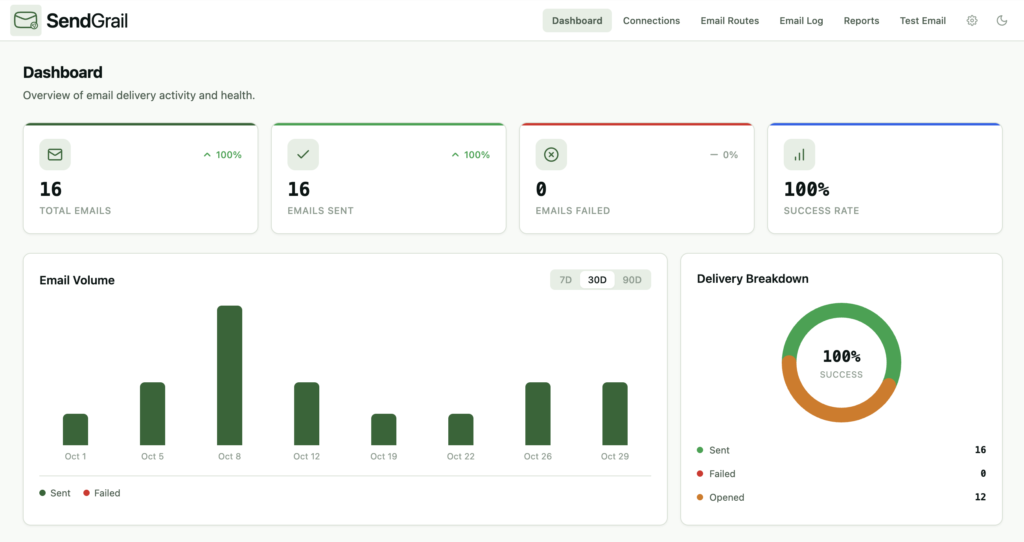
SendGrail gives you the features other plugins save for their paid plans. Email logs, a backup connection, routing rules and open and click tracking all come in the free download. There is no Pro version to upsell you.
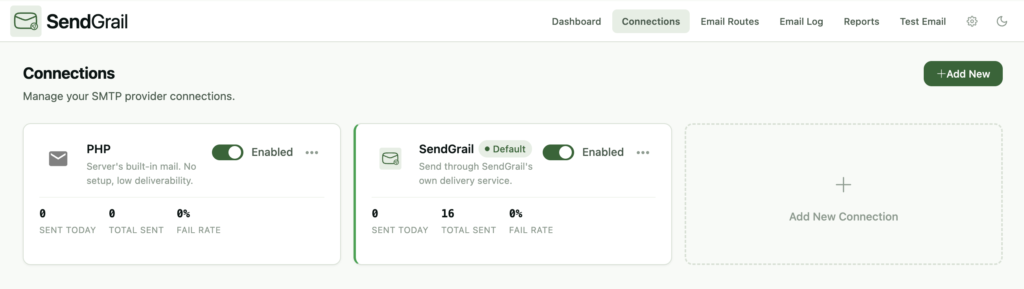
That matters most when something breaks. If your main provider goes down or rejects a message, SendGrail resends it through your fallback connection automatically. Your password resets and order emails keep flowing while you fix the problem.
What you’ll like:
- Backup connection, free. Pick a fallback provider and SendGrail switches to it when the primary fails.
- Routing rules. Send different emails through different providers, for example store receipts through Amazon SES and form alerts through Google Workspace.
- A full email log. See every email with its status and timestamp, preview it, and resend with one click. Logs stay in your own database.
- Open and click tracking. See whether people actually read your emails, right in WordPress.
- 18 integrations, all free. Google Workspace, Microsoft Outlook, Amazon SES, Brevo, Mailgun, SendGrid, Postmark, Mailjet, Zoho Mail, SMTP2GO, Resend, SparkPost, Elastic Email, SendLayer, Mandrill, Netcore and more, plus any custom SMTP server.
- Built for agencies. Multisite support lets you manage settings centrally or per sub-site, and you can store credentials in
wp-config.php.
Verdict: If you want logs, failover, routing and tracking without paying for any of it, SendGrail is the best value on this list.
2. FluentSMTP: best proven free option
Price: Free, no paid tier · Active installs: 700,000+ · Best for: Anyone who wants a free plugin with a long track record
FluentSMTP comes from the team behind Fluent Forms and FluentCRM. It’s free and open source, and the developers have promised never to release a Pro version.
It’s also more capable than many people expect. You get a full email log with resend, a fallback connection that takes over when your primary fails, and routing based on the From address. It can alert you on Slack, Telegram, Discord or Pushover when sending breaks.

Provider support is strong too: Amazon SES, Gmail, Outlook, SendGrid, Mailgun, Brevo, Postmark, SparkPost, SMTP2GO, Elastic Email, Zoho Mail, Cloudflare Email Sending and any SMTP server.
Watch out for: There’s no open or click tracking, so you can see that an email left your site but not whether anyone read it. Routing works by sender address only.
Verdict: A great free pick with years of real-world use. Choose SendGrail instead if you want open and click tracking and more flexible routing rules.
3. WP Mail SMTP: a paid option with reputation
Price: Free; Pro from $49/year (renews at $99) · Active installs: 4 million+ · Best for: Site owners who want guided setup and paid support
WP Mail SMTP is the most popular SMTP plugin by a wide margin, with 4 million+ active installs and a 4.8-star rating. Its setup wizard walks you through every step, and the documentation is excellent.

The free version handles the basics well. It supports 13 mailers including SendLayer, Brevo, Gmail, Mailgun, Postmark, SendGrid and SMTP2GO, plus any other SMTP server.
The catch is what sits behind the paywall. Email logs, backup connections, smart routing, open and click tracking, failure alerts and multisite tools are all Pro features. So are three popular mailers: Microsoft Outlook/Office 365, Amazon SES and Zoho Mail.
| Plan | Sites | First year | Renewal |
|---|---|---|---|
| Pro | 1 | $49 | $99 |
| Elite | 1 | $99 | $149 |
| Developer | 20 | $199 | $249 |
| Agency | 100 | $399 | $449 |
Verdict: A safe, well-supported choice if you’re happy to pay. If you want logs, a backup connection, routing and tracking without the yearly bill, SendGrail gives you all of them free.
4. Post SMTP: best for failure alerts and mobile monitoring
Price: Free; Pro from $59.99/year · Active installs: 300,000+ · Best for: Developers and site managers who live on alerts
Post SMTP focuses on telling you the moment something goes wrong. The free version includes an email log, a fallback mailer, email failure alerts and a mobile app that pushes notifications to your phone.
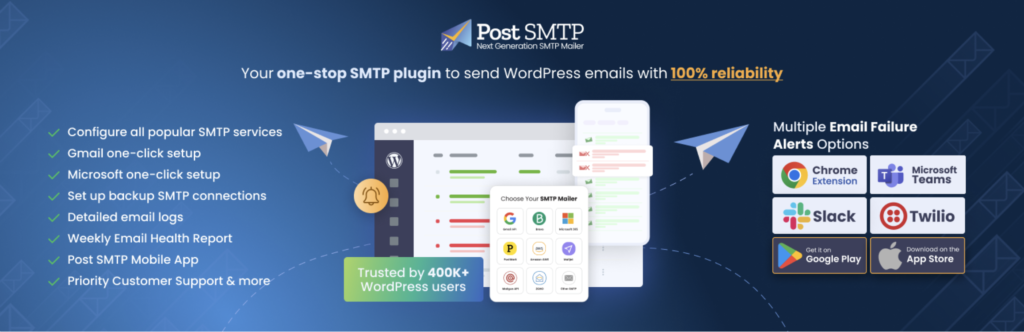
Its debugging tools are a real strength. When an email fails, the log shows the error so you can find the cause fast.
Many of the extras sit in the paid plans: open tracking, automatic resend of failed emails, one-click Gmail and Microsoft setup, and Slack, Teams and SMS alerts. Pro plans run $59.99 (Basic), $79.99 (Professional) and $99.99 (Business) per year.
Watch out for: The settings screens are busier than the others, which can overwhelm first-time users. Some recent reviews also mention the plugin feeling heavier after updates.
Verdict: Pick Post SMTP if fast failure alerts are your top priority. If you want a simpler setup with open and click tracking included free, go with SendGrail.
5. GoSMTP: cheapest Pro plan
Price: Free; Pro from $39/year · Active installs: 500,000+ · Best for: Small sites that want a clean interface and don’t mind a small fee
GoSMTP comes from Softaculous, the company behind the popular hosting installer. That’s a big reason it passed 500,000 active installs. The interface is clean and easy to follow.

The free version supports 8 mailers including Brevo, Mailgun, SendGrid, Postmark and SparkPost, plus custom SMTP. Email logs, a secondary backup connection, smart routing (added in April 2026) and failure alerts all need Pro.
Google Workspace, Outlook, Amazon SES and Zoho also need Pro. Pricing is $39 for 1 site, $75 for 5 sites or $200 for 100 of your own sites per year.
Watch out for: Open and click tracking is still listed as “coming soon” on WordPress.org.
Verdict: The most affordable paid option. But if you’re going to pay for logs and a backup connection, check whether a free plugin already covers you.
6. SMTP Mailer: best for a bare-bones setup
Price: Free · Active installs: 70,000+ · Best for: Personal blogs with one provider and low email volume

SMTP Mailer does one job. You enter your SMTP host, port, username and password, send a test email and you’re done.
That simplicity is the appeal. There’s nothing to learn and almost nothing to slow your site down.
Watch out for: There’s no built-in email log (it’s a separate add-on), no backup connection and no alerts. If your provider fails, you won’t know until someone complains.
Verdict: Fine for a hobby blog. For any site that makes money, choose a plugin with logs and a backup connection.
WordPress SMTP plugins compared: features and pricing
Here’s how the six plugins stack up on the features that matter most. “Free” means it’s in the free version; a price means you need that paid plan.
| Plugin | Paid plan from | Integrations | Email log | Backup connection | Routing rules | Open/click tracking | Outlook + Amazon SES |
|---|---|---|---|---|---|---|---|
| SendGrail | No paid plan | 18 (all free) | Free | Free | Free | Free | Free |
| FluentSMTP | No paid plan | 15 (all free) | Free | Free | Free (by sender) | No | Free |
| WP Mail SMTP | $49/yr | 17 (14 free) | Pro | Pro | Pro | Pro | Pro |
| Post SMTP | $59.99/yr | 20+ (most need Pro) | Free | Free | No | Pro | Pro |
| GoSMTP | $39/yr | 17 (9 free) | Pro | Pro | Pro | Coming soon | Pro |
| SMTP Mailer | No paid plan | 1 (custom SMTP) | Add-on | No | No | No | Custom SMTP only |
Which WordPress SMTP plugin should you choose?
- You want everything free, with tracking: SendGrail.
- You want a free plugin with years of reviews: FluentSMTP.
- You want a guided setup and paid support: WP Mail SMTP.
- You want instant alerts on your phone: Post SMTP.
- You want the cheapest paid plan: GoSMTP.
- You run a tiny blog with one provider: SMTP Mailer.
Pro tip: Whatever you pick, set up a backup connection on a different provider. If both connections use the same service, one outage takes down both.
How to set up SendGrail in 5 minutes
You don’t need to write code or touch a server. Have your email provider’s API key or SMTP login ready, then follow these steps.
Step 1: Install the plugin. In your WordPress dashboard, go to Plugins → Add New and search for “SendGrail”. Click Install Now, then Activate.
Step 2: Connect your main provider. Open SendGrail and follow the setup wizard. Pick your provider (Amazon SES, Brevo, Google Workspace, Mailgun and so on) and paste in your API key or SMTP details.

Step 3: Add a backup connection. Add a second provider, then choose it as your fallback connection in Settings. If your main provider fails, SendGrail sends through the backup automatically.
Step 4: Check your domain’s DNS. Add the SPF, DKIM and DMARC records your email provider gives you. This step is what gets you past Gmail and Yahoo’s sender rules.
Step 5: Send a test email. Send a test to your own inbox. Then open the email log to confirm it shows as sent.
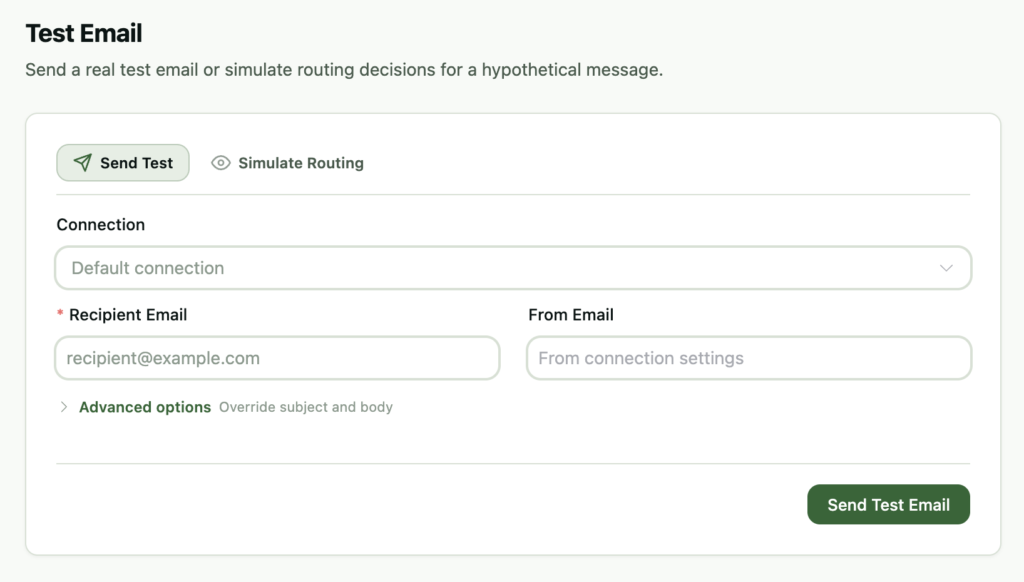
That’s it. From now on, every WordPress email goes through a trusted provider, with a backup ready and a log you can check anytime.
Pro tip: Running a busy store or several sites? Set up an email route so order emails use one provider and everything else uses another.
Frequently asked questions
What is the best free SMTP plugin for WordPress?
SendGrail is the best free SMTP plugin for WordPress. It includes email logs, a backup connection, routing rules, open and click tracking and 18 integrations, with no paid tier. Most other plugins charge for at least some of those features.
Do I need an SMTP plugin for WordPress?
Yes, if your site sends anything important. By default, WordPress sends email through PHP mail on your web server, which usually lacks SPF and DKIM authentication. Gmail and Yahoo now require authenticated mail, so unauthenticated messages often land in spam or vanish.
Why is WordPress not sending emails?
The most common cause is that your host blocks or limits PHP mail. Other causes are missing SPF or DKIM records, a blacklisted shared server IP, or a typo in your From address. Installing an SMTP plugin and connecting a real email provider fixes most of these.
Is WP Mail SMTP really free?
WP Mail SMTP has a free version with limited features. Email logs, backup connections, smart routing, tracking, alerts and the Outlook, Amazon SES and Zoho mailers need a Pro plan, which starts at $49 for the first year and renews at $99.
Can I use Gmail as my WordPress SMTP server?
Yes, most SMTP plugins connect to Gmail or Google Workspace. A personal Gmail account has a daily sending limit, so it suits low-volume sites. For a store or busy site, use Google Workspace or a transactional service like Amazon SES, Brevo or Postmark.
What is a backup (fallback) SMTP connection?
It’s a second email provider your plugin switches to when the main one fails. If your primary service has an outage, hits a limit or rejects a message, the plugin resends through the backup. SendGrail, FluentSMTP and Post SMTP include this free; WP Mail SMTP and GoSMTP charge for it.
Will an SMTP plugin slow down my site?
No, not in any way you’ll notice. SMTP plugins only run when WordPress sends an email. If you log every email, set logs to auto-delete after a while so your database stays lean.
The bottom line
The best WordPress SMTP plugin is the one that gets your email delivered and tells you when it doesn’t. That means an email log and a backup connection, at minimum.
If you’re happy to pay for support, WP Mail SMTP is a safe bet. If you want a proven free plugin, FluentSMTP is excellent. If you want logs, failover, routing and tracking in one free plugin with no upsell, SendGrail gives you the most for nothing.
Your next step: Download SendGrail free from WordPress.org and send your first test email in the next 5 minutes.